


Gamdom App Canada: Play Gamdom on Your Phone
Gamdom is built to run in a mobile browser. No install is required: the same account, balance, slots, Originals and Rewards are available on your phone as on your computer. This page explains how Canadian players use Gamdom on mobile and how to pin it to the home screen so it opens like an app.
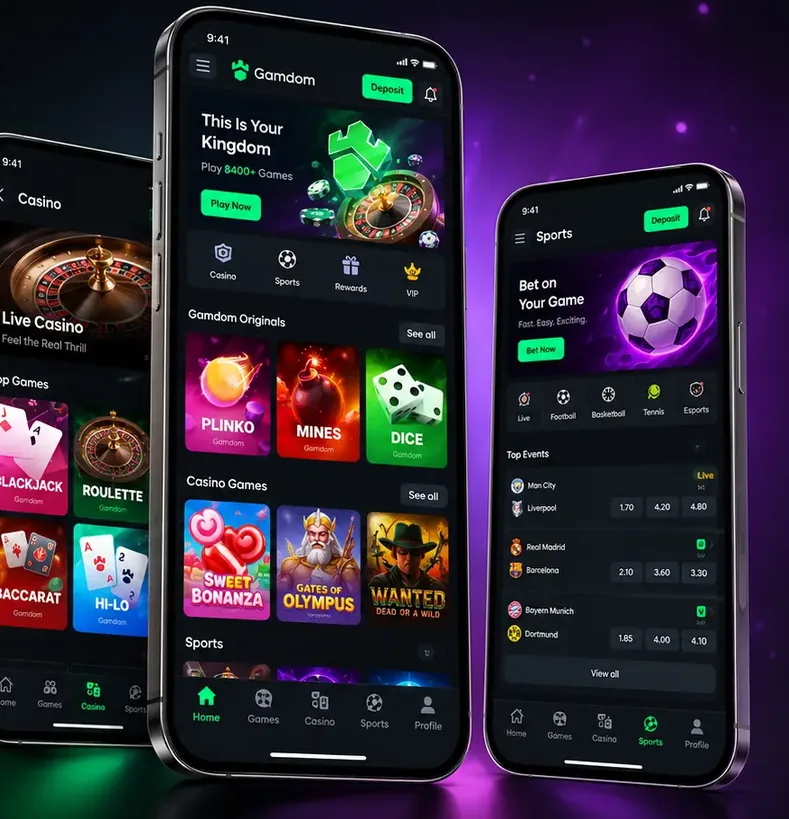
Using Gamdom on Mobile
No app store required — everything happens in the browser you already use.
- Open Gamdom in your browser
Safari or Chrome both work. Using our link helps make sure the promo code is picked up at sign-up.
- Register or log in
New players: enter 15BOOST in the Referral Code field. Existing players: sign in as usual.
- Add to home screen (optional)
Use your browser's share or menu button and choose Add to Home Screen for a one-tap shortcut.
- Play
The lobby is laid out for portrait screens. Check Rewards to confirm the 15% rakeback card is active.
What the Gamdom Mobile Version Offers
Portrait-first lobby
Bottom tabs switch between Home, Games, Casino, Sports and Profile — easy to use one-handed.
Same account and balance
No separate mobile account. Balance, Rewards and leaderboard position stay in sync with desktop.
Originals suit short sessions
Crash, Plinko and Mines take seconds per round, which makes them a natural fit for a few minutes on the go.
Launch from the home screen
Pin Gamdom with Add to Home Screen and it opens without the browser chrome, much like an installed app.
Nothing to update
Because it runs in the browser, you always see the current lobby without app-store updates.
Wi-Fi recommended
Live casino and graphics-heavy slots use more data. A stable connection makes for a smoother session.
Adding Gamdom to Your Home Screen
This is a standard browser feature that works with any website. Open Gamdom first, then follow the steps for your phone.
iPhone (Safari)
- Tap the Share button
The square icon with an upward arrow at the bottom of the screen.
- Choose Add to Home Screen
Scroll down the share sheet to find it.
- Confirm the name and tap Add
A Gamdom icon appears on your home screen.
Android (Chrome)
- Tap the menu (⋮) in the top-right
Next to the address bar.
- Choose Add to Home screen or Install app
The wording depends on your device and Chrome version.
- Tap Add
From then on Gamdom opens with a single tap.
We have not confirmed an official Gamdom app on the App Store or Google Play. Avoid installing anything calling itself a "Gamdom App" from unknown sources — open the official site in your browser instead.
Things Canadian Players Should Know About Mobile
I searched the App Store and found nothing.
That matches what we found — no confirmed official app. Open Gamdom in Safari or Chrome and add it to your home screen for an app-like shortcut.
Does 15BOOST work if I sign up on my phone?
Yes. Enter 15BOOST in the Referral Code field on the sign-up form, or later under Rewards → Special Rewards.
There is an app called "Gamdom App" in the store.
If you cannot verify it is official, do not install it. Only enter your login details on the official site opened in your browser.
Mobile data or Wi-Fi?
Wi-Fi where possible. Live casino and animated slots use more data, and long sessions drain the battery, so take breaks.
Editorial content to help you get set up. The status of official apps may change.
Gamdom App FAQ
We have not confirmed an official Gamdom app in either store. Gamdom is designed to run in your phone’s browser, and adding it to your home screen gives you an app-style shortcut.
You reach the same lobby with the same account, so games, Rewards and leaderboards are all there. The layout switches to a portrait, thumb-friendly design.
You get an icon that opens Gamdom in one tap, and the browser address bar is hidden, so it feels like an app. Because it still runs in the browser there is nothing to update manually.
Yes. Use the Referral Code field on the sign-up form or Rewards → Special Rewards afterwards, exactly as on desktop. Code: 15BOOST. See the promo code page.
Slots and live casino stream video-style graphics, so Wi-Fi is the better choice for longer sessions. Long sessions also drain the battery, which is another good reason to take breaks.